Barcode Basics
UPC-A vs EAN-13: Differences and How to Convert Between Them
- UPC-A
- EAN-13
- GTIN
- GS1
- barcode conversion
- retail barcodes
Table of Contents
- The Short Answer
- UPC-A vs EAN-13 at a Glance
- The Differences That Actually Matter
- Can US Stores Scan EAN-13?
- How to Convert UPC-A to EAN-13
- How to Convert EAN-13 to UPC-A
- Which Should You Use?
- How to Create a UPC-A or EAN-13 Barcode
- Common Mistakes
- Frequently Asked Questions
- Final Thoughts
The Short Answer
UPC-A and EAN-13 are the same retail identification system in two lengths. UPC-A carries a 12-digit GTIN and grew up in North America. EAN-13 carries a 13-digit GTIN and is used around the world. Both are managed through GS1, both are scanned at retail checkouts, and both use the same check digit calculation.
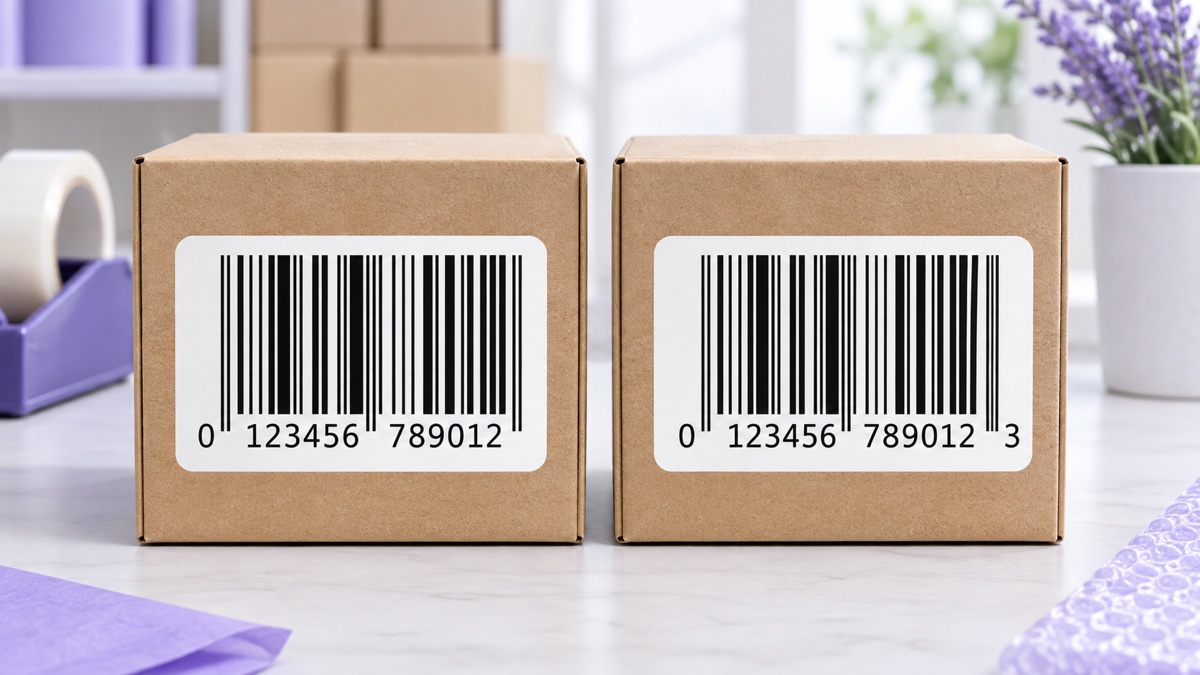
The key conversion fact is simple: a UPC-A is an EAN-13 that starts with 0. Add a leading zero to any valid UPC-A and you get a valid EAN-13 for the same product. For example, UPC-A 614141123452 becomes EAN-13 0614141123452.
The reverse works only when the EAN-13 begins with 0. If it begins with any other digit, it has no UPC-A equivalent.
UPC-A vs EAN-13 at a Glance
| Feature | UPC-A | EAN-13 |
|---|---|---|
| Digits | 12 | 13 |
| GS1 identifier name | GTIN-12 | GTIN-13 |
| Traditional region | United States and Canada | Worldwide |
| Scanned at US checkouts | Yes | Yes |
| Check digit method | GS1 modulo 10 | GS1 modulo 10 |
| Conversion | Always converts to EAN-13 by adding 0 | Converts to UPC-A only when it starts with 0 |
| Quiet zones | 9 modules on each side | 11 modules on the left, 7 on the right |
The Differences That Actually Matter
1. Length: 12 vs 13 digits
The visible difference is one leading digit. GS1 now calls the identifiers GTIN-12 and GTIN-13. The barcode is the data carrier; the GTIN is the identifier encoded in it.
2. The bars are more alike than they look
A UPC-A and the EAN-13 version of that number with a leading zero have identical bar patterns. EAN-13 represents its first digit through the pattern used for the left-hand digits, and a first digit of 0 produces the UPC-A pattern.
The human-readable digits are laid out differently. UPC-A prints the first and last digits outside the main groups of bars. EAN-13 prints its first digit to the left, followed by two groups of six digits.
3. Quiet zones
The quiet zone is the blank margin a scanner needs on each side. UPC-A uses a minimum of 9 modules on both sides. EAN-13 uses 11 modules on the left and 7 on the right. When artwork changes format, verify the margins again instead of cropping the existing label.
4. Prefixes do not mean country of origin
The first digits identify the GS1 organization that licensed the number, not where the product was manufactured. A product made in one country can carry a GTIN issued through a business based in another.
5. What is identical
The check digit calculation, the need for a distinct GTIN for each product variant, and the overall retail scanning workflow are the same. See how to calculate a barcode check digit for the complete method.
Can US Stores Scan EAN-13?
Yes. North American retailers expanded their systems to support 13-digit EAN-13 data during the Sunrise 2005 transition. Modern point-of-sale scanners read both formats.
The remaining problem is usually paperwork rather than scanning. Some older item-setup forms still accept only 12 characters. Submit the full 13-digit GTIN through the retailer's supported process rather than dropping digits or inventing a second number.
How to Convert UPC-A to EAN-13
Add a 0 to the front. The check digit stays the same because the new leading zero contributes nothing to the calculation.
| UPC-A | EAN-13 | Check digit |
|---|---|---|
| 036000291452 | 0036000291452 | 2, unchanged |
| 614141123452 | 0614141123452 | 2, unchanged |
You can recalculate the digit as a check, but the answer must stay the same. A different result means there is an arithmetic or data-entry error.
Converting a list in Excel
If each UPC is stored as text in column A, use ="0"&A2. Format the result as Text so Excel preserves the leading zero. If a spreadsheet has already removed leading zeros, compare it with the original data before rebuilding the values. The Excel barcode guide has more validation formulas.
How to Convert EAN-13 to UPC-A
This conversion is possible only when the EAN-13 starts with 0. Remove that leading zero and keep the other 12 digits, including the existing check digit.
| EAN-13 | Starts with 0? | UPC-A result |
|---|---|---|
| 0036000291452 | Yes | 036000291452 |
| 0614141123452 | Yes | 614141123452 |
| 4006381333931 | No | No UPC-A equivalent |
| 9780306406157 | No | No UPC-A equivalent |
If the first digit is not 0, do not drop it, pad the value, or register a second number for the same product. Those changes create another identifier and may collide with a number assigned to someone else.
What if a US form demands 12 digits?
Provide the 13-digit GTIN through the retailer's item-setup team or use a GTIN-14 field when the form supports one. The scanning system can handle EAN-13 even when a legacy form cannot.
Which Should You Use?
Use the symbol that matches the identifier GS1 issued, and give each product variant one number rather than one number per country.
- GTIN-12 from GS1 US: print UPC-A. It scans in North America and elsewhere.
- GTIN-13 from another GS1 organization: print EAN-13. It scans worldwide, including the United States and Canada.
- Selling in several countries: keep one GTIN for each product variant. Do not create separate UPC and EAN identities for the same item.
- Books: encode the assigned ISBN-13 as EAN-13. The ISBN barcode guide explains the details.
How to Create a UPC-A or EAN-13 Barcode
- Start with a licensed GTIN assigned to your business and product variant.
- Choose UPC-A for 12 digits or EAN-13 for 13 digits.
- Use the UPC Code Generator or select EAN-13 in the Barcode Generator. Enter 11 UPC-A data digits or 12 EAN-13 data digits to have the check digit added, or enter the complete number for validation.
- Keep dark bars on a light background and preserve the complete quiet zones.
- Download the print-ready PDF. The current PDF embeds a high-resolution PNG; if a packaging workflow requires true vector artwork, use a compatible production tool or print specialist.
- Test-scan a printed proof with the equipment used in the real workflow.
For a whole catalog, paste one value per line into the Bulk Barcode Generator and generate the batch in one format.
Common Mistakes
- Recalculating to a different check digit after adding zero: the digit must remain unchanged.
- Dropping a non-zero first digit: this creates another identifier, not a UPC equivalent.
- Registering two numbers for one product: duplicate identities split catalog and sales data.
- Losing leading zeros in spreadsheets: store GTINs as text.
- Reading a prefix as country of manufacture: it identifies the issuing GS1 organization.
- Cropping the EAN-13 left margin: it needs a wider left quiet zone than UPC-A.
- Using resold or unlicensed numbers: a valid check digit does not prove ownership.
Frequently Asked Questions
What's the difference between UPC and EAN?
UPC-A is a 12-digit retail barcode that originated in North America, and EAN-13 is a 13-digit version used in most other countries. They belong to the same GS1 system, use the same check digit method, and are both scanned at retail checkouts worldwide. A UPC-A is effectively an EAN-13 with a leading zero, so the two are fully compatible. The main practical differences are the digit count, printed text layout, and quiet-zone rules.
Can I use an EAN-13 barcode in the United States?
Yes. North American retail systems have supported EAN-13 since the Sunrise 2005 transition. The occasional issue is an older item-setup form with a 12-digit field. Ask the retailer how to submit a 13-digit GTIN instead of altering the number.
Can I use a UPC-A barcode in Europe or elsewhere?
Yes. EAN-13 scanners can read UPC-A because a UPC-A has the same bars as an EAN-13 that starts with zero. Some systems store the scanned value with that leading zero added, but the barcode itself does not need to change.
Does converting UPC to EAN change the check digit?
No. Adding a leading zero never changes the check digit because that zero contributes nothing to the weighted sum. For example, 036000291452 becomes 0036000291452, and the final 2 stays the same.
How do I know if an EAN-13 can become a UPC-A?
Look at the first digit. If it is 0, remove it and the remaining 12 digits are a valid UPC-A with the same check digit. If the first digit is 1 through 9, that number has no UPC-A version.
Is a JAN code the same as EAN-13?
Yes. JAN-13 is the Japanese name for an EAN-13 that uses a GS1 Japan prefix. It uses the same symbol and rules and scans anywhere EAN-13 is supported. JAN-8 is the Japanese name for the corresponding 8-digit format.
Should I get a UPC or an EAN for my product?
Get the GTIN from the GS1 organization serving the country where your business is based and print the symbol that matches its length. Either UPC-A or EAN-13 can work internationally. What matters is that the number is licensed to your brand and that every product variant has one distinct GTIN.
What about UPC-E and EAN-8?
They are short formats for small packages, but they do not convert into each other the way UPC-A and EAN-13 do. UPC-E is a compressed representation of eligible UPC-A numbers. EAN-8 is a separately assigned 8-digit GTIN. Ask your GS1 organization before choosing either.
Final Thoughts
UPC-A and EAN-13 are not competing systems. They are the same GS1 retail identification system in 12- and 13-digit forms. Converting UPC-A to EAN-13 means adding one leading zero, with no check digit change. Converting back works only when that leading digit is 0.
Use the GTIN assigned to your product, keep one number per variant, and print it in the matching format. When you are ready, create it with the UPC Code Generator or the Barcode Generator.
Enjoyed this post?
Share it with your network